 Pay4SaaS
Webhook
Webhooks are real-time notifications sent from payment providers to your server. Successful payments, subscription status changes, renewal failures — all these events are communicated to your backend via Webhooks.
How It Works
User pays → Payment provider processes → Sends Webhook → Your /api/webhooks/{provider} → Updates databasePay4SaaS has all Webhook receiving and processing logic built in — you just need to configure the Webhook URLs in your payment provider's dashboard.
Webhook Endpoints
| Provider | Endpoint | Configuration Location |
|---|---|---|
| Stripe | /api/webhooks/stripe | Stripe Dashboard → Webhooks |
| PayPal | /api/webhooks/paypal | PayPal Developer → Webhooks |
| Creem | /api/webhooks/creem | Creem Dashboard → Webhooks |
| Alipay | /api/webhooks/alipay | Alipay Open Platform → App Gateway |
Production Webhook URL format: https://yourdomain.com/api/webhooks/{provider}
Supported Events
Stripe
| Event | Purpose |
|---|---|
checkout.session.completed | Credits purchase, lifetime purchase, first subscription |
customer.subscription.created | Subscription created (active or trial) |
customer.subscription.updated | Subscription status change |
customer.subscription.deleted | Subscription canceled/expired |
invoice.paid | Subscription renewal success |
invoice.payment_failed | Subscription renewal failure |
PayPal
| Event | Purpose |
|---|---|
BILLING.SUBSCRIPTION.ACTIVATED | Subscription activated |
BILLING.SUBSCRIPTION.CANCELLED | Subscription canceled |
BILLING.SUBSCRIPTION.EXPIRED | Subscription expired |
BILLING.SUBSCRIPTION.SUSPENDED | Subscription suspended |
PAYMENT.SALE.COMPLETED | Payment completed (renewal) |
CHECKOUT.ORDER.APPROVED | One-time purchase completed |
Creem
| Event | Purpose |
|---|---|
checkout.completed | Checkout completed (credits/lifetime) |
subscription.active | Subscription activated |
subscription.trialing | Trial started |
subscription.paid | Renewal success |
subscription.canceled | Subscription canceled |
subscription.expired | Subscription expired |
Webhook Signature Verification
Each payment provider has a signature verification mechanism to prevent forged requests:
- Stripe: Uses
STRIPE_WEBHOOK_SECRETto verify thestripe-signatureheader - PayPal: Uses
PAYPAL_WEBHOOK_IDto verify via the PayPal API - Creem: Uses
CREEM_WEBHOOK_SECRETto verify the HMAC signature - Alipay: Uses certificates to verify request signatures
All of these are already implemented in their respective Webhook handlers — you just need to configure the keys.
Local Debugging
During local development, payment providers cannot directly access localhost. You need to use a tunneling tool to create a public URL.
Use ngrok — a tunneling tool that temporarily exposes your local service to the public internet so payment providers can reach your Webhook endpoint. The free tier includes 20k requests/month, more than enough for development.
Important! If you're testing payments, you must have ngrok running. Without it, the payment flow won't work — providers can't send Webhook callbacks to localhost. My habit is to start ngrok alongside
pnpm devevery day.
Download it here: https://ngrok.com/download/.
Sign up and log in, then go to https://dashboard.ngrok.com/get-started/your-authtoken to get your token.
Unzip and run: ngrok config add-authtoken your-token, then ngrok http + your project's localhost port. You'll see something like this:
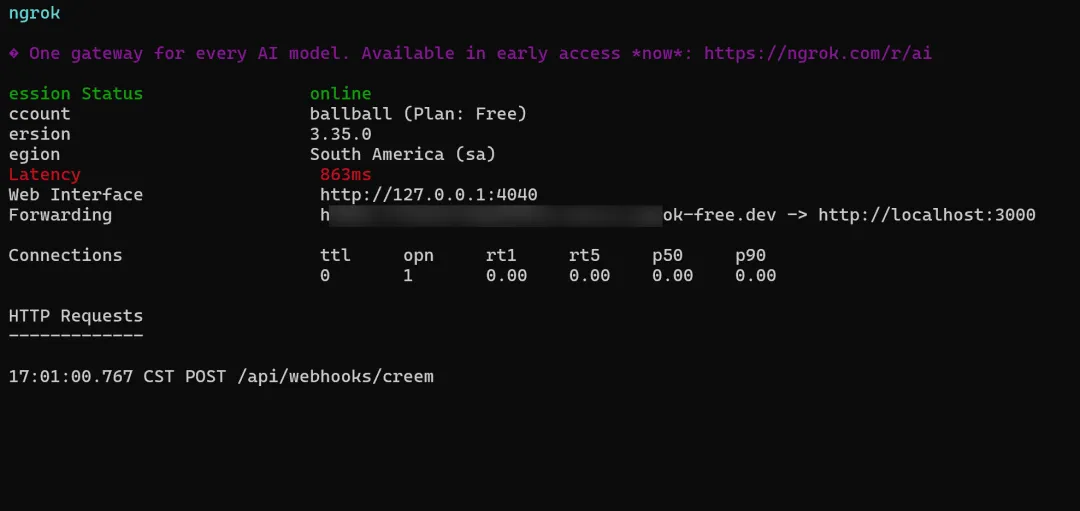
Copy the forwarding URL and use it to configure Webhooks in your payment provider's dashboard.
Using ngrok
ngrok http 3000This gives you a public URL (e.g., https://xxxx.ngrok.io), then:
- Set the Webhook URL in the payment provider's dashboard to
https://xxxx.ngrok.io/api/webhooks/{provider} - Start the project locally with
pnpm dev - Trigger a payment and check the terminal logs
Important Notes
- Remember to change the Webhook URL to your production domain when going live
Docs home
Return to the full implementation guide.
Pricing
Review subscriptions, credits, and lifetime options.
Blog
Read more notes on SaaS payments and growth.